AfterGlow
Your desktop, quietly aware.
Live ASCII wallpapers that glow when something happens.
Free and open source, for macOS and Windows.
Install
macOS
- Copy this line:
curl -fsSL https://raw.githubusercontent.com/wajenaqv/afterglow/main/install.sh | sh - Press ⌘ Space, type Terminal, press Return.
- Press ⌘ V, then Return.
AfterGlow opens in your menu bar. Apple Silicon and Intel. Read the script.
Windows
- Copy this line:
irm https://raw.githubusercontent.com/wajenaqv/afterglow/main/install.ps1 | iex - Press the Windows key, type PowerShell, press Enter.
- Press Ctrl V, then Enter.
AfterGlow opens in your tray, by the clock. No admin needed. Read the script.
Why a line to paste? AfterGlow is a free hobby project without paid signing, so a downloaded installer shows a security warning. You can still download it by hand.
How it feels
A message arrives, and the wallpaper lights up in that app's colour, each in its own way, then slowly fades. Things pile up, and the scene fills. No popups, no badges, no sounds.
Pick a scene
Creatures, skies, abstract light and clocks, each with its own palettes. More are on the way.
Keep awake
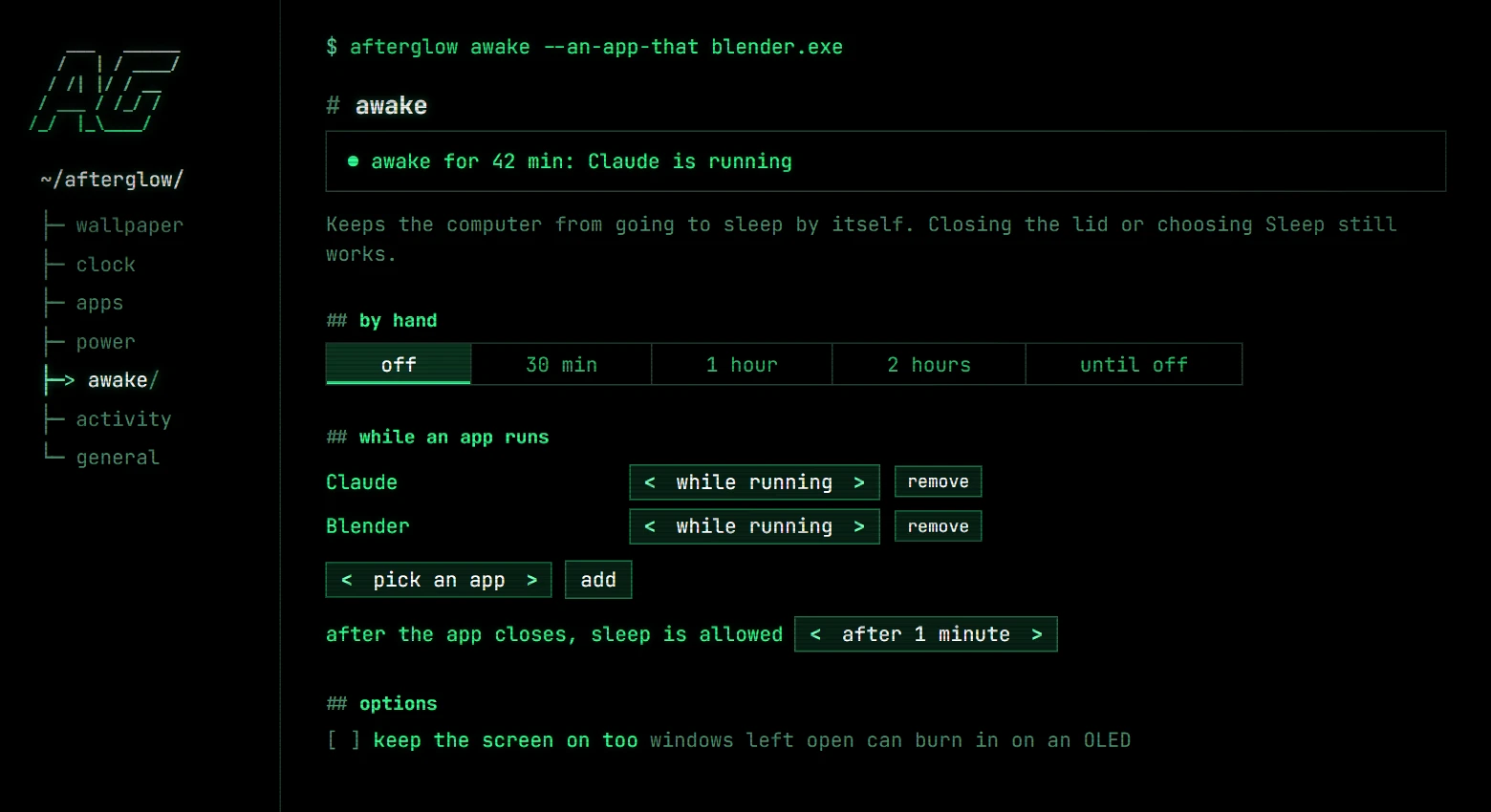
Claude working through a long task, a render, a big download? AfterGlow can keep your computer from going to sleep: for a while, until you turn it off, or only while the apps you pick are running or in front.
Private by design
AfterGlow has no server, no account and no telemetry. It keeps which app and how many, never what a message says. It only goes online to look for updates on GitHub once a day, which you can switch off, and for the accounts you connect yourself (Google, Microsoft, Spotify, Steam), straight from your computer. Sign-in tokens stay in your system's keychain.
Questions
Will it slow down my games?
It pauses while something is fullscreen, when windows cover it, and on battery.
How do I update it?
When a new version is ready, a line in its menu says so: click it to restart into it.
How do I remove it?
Quit it first, which brings your desktop picture back. Then, on macOS, delete AfterGlow from Applications; on Windows, uninstall it in Settings → Apps.
Why can't I see it?
Quit other live wallpaper apps: they cover it.